

What Is a Desktop Fiber Laser Marking Machine?
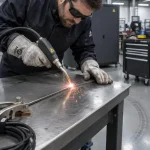
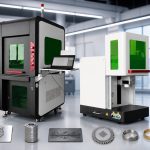
If you’ve been searching for a permanent, high-speed marking solution that fits on a workbench rather than occupying half your factory floor, this is the question you’re here to answer. A desktop fiber laser marking machine is a compact, self-contained laser system that uses a solid-state fiber laser source to engrave, mark, or etch permanent identifiers—serial numbers, barcodes, logos, and QR codes—onto metal and plastic parts with micron-level precision. Unlike bulkier CO₂ or UV systems, these benchtop units are designed for small workshops, prototyping labs, and low-to-medium-volume production environments where floor space is at a premium. The compact form factor is what sets the desktop fiber laser marking machine apart from larger industrial counterparts, making it accessible to businesses that previously could not justify the space or budget for laser marking.
How It Works
The core technology is a fiber laser—a laser where the gain medium is an optical fiber doped with rare-earth elements, typically ytterbium. An electrical current drives pump diodes that inject light into the fiber, exciting the ytterbium ions to produce a beam at 1064 nm wavelength. This near-infrared beam is then directed through a galvanometer scanner (galvo head) consisting of two high-speed mirrors that steer the laser spot across the X and Y axes. An F-theta lens focuses the beam to a spot size as small as 0.01 mm, enabling intricate marking at speeds up to 12,000 mm/s. The entire process is non-contact, meaning there is no tool wear, no mechanical stress on the workpiece, and no need for clamping fixtures in most cases. A desktop fiber laser marking machine can complete a typical serial number or Data Matrix code in under one second.
Key Components of a Desktop Fiber Laser Marker
A typical desktop fiber laser marker machine is built from these core subsystems:
- Fiber laser source – 20W to 50W output power, air-cooled, with a rated lifespan of 50,000–100,000 operating hours
- Galvo scanner head – dual-axis mirrors with closed-loop position feedback for repeat accuracy of ±0.001 mm
- F-theta focusing lens – determines the marking field size (typically 110×110 mm to 200×200 mm)
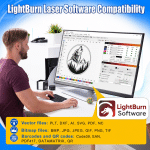
- Industrial controller and marking software – manages laser parameters and imports vector/raster files (AI, DXF, PLT, BMP)
- Air-cooling system – no water chiller required, reducing maintenance complexity
- Enclosed or open-frame work area – Class 1 safety enclosure optional for integration into production lines
Desktop vs. Industrial Fiber Laser Marking Machine: What’s the Difference?
Many buyers wonder whether a desktop unit can replace a full-scale industrial fiber laser marking machine. The answer depends on your production volume, part size, and depth requirements. The table below breaks down the key differences between a desktop fiber laser marking machine and its industrial-grade sibling.
| Feature | Desktop Fiber Laser Marking Machine | Industrial Fiber Laser Marking Machine |
|---|---|---|
| Typical laser power | 20W–50W | 50W–300W+ |
| Footprint | Benchtop, fits on a desk | Standalone cabinet or integrated into production line |
| Cooling method | Air-cooled (zero water) | Air or water-cooled |
| Overall power consumption | 200–500W | 1–3 kW |
| Marking field size | 110×110 mm to 200×200 mm | 200×200 mm to 600×600 mm |
| Typical use case | Small batches, prototyping, job shops | 24/7 high-volume production, full automation |
| Price range | $1,800–$7,000 | $8,000–$50,000+ |
| Maintenance | Zero consumables, minimal | Low, but more complex (water filters, chiller servicing) |
For most small and medium businesses, a desktop fiber laser marking machine delivers 80–90% of the industrial machine’s capability at a fraction of the cost and footprint. The trade-off is a smaller marking area and lower throughput for deep engraving. However, for marking small to medium-sized parts, the desktop form factor is often the more practical choice.
What Materials Can a Desktop Fiber Laser Marking Machine Handle?
Fiber lasers operate at 1064 nm, a wavelength that is absorbed exceptionally well by metals. This makes them the preferred choice for metal marking across virtually every industry. A desktop fiber laser marking machine can handle a wide range of materials, though it is optimized for metallic surfaces.
Metals – excellent marking quality:
- Stainless steel, carbon steel, tool steel
- Aluminum and anodized aluminum (black annealing possible)
- Copper, brass, bronze
- Titanium
- Gold, silver, platinum
Plastics – good on engineered types:
- ABS, polycarbonate, nylon
- Polyethylene, polypropylene
- Some acrylics and hard polymers
Not suitable for:
- Wood, leather, fabric (a CO₂ laser is better for organics)
- Clear glass or transparent plastics
- Highly reflective metals without pulse-control capability (MOPA fiber lasers help here)
If your primary marking targets are metal parts—from stainless steel nameplates to aluminum housings—a fiber marking machine in desktop format is the right tool for the job.
Common Applications Across Industries
Laser marking machines in the desktop category have found their way into nearly every manufacturing and fabrication sector. Here are the most prominent application areas where a desktop fiber laser marking machine delivers real value.
Jewelry and Personalization
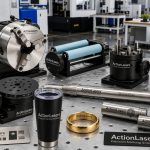
From engraving wedding bands with custom text to marking serial numbers on luxury watches, the fine beam quality (M²<1.5) of a desktop fiber laser marking machine delivers sub-millimeter detail that hand engraving cannot match. Jewelers use these machines to apply hallmarks, logos, and decorative patterns on gold, silver, and platinum without damaging the workpiece.
Automotive and Aerospace Parts Marking
VIN numbers, date codes, part numbers, and 2D Data Matrix codes on metal components are required for traceability throughout the supply chain. A desktop fiber laser marker machine in a quality-control station can mark a connecting rod or brake caliper in under one second. The mark is permanent, heat-resistant, and readable through paint and oil.
Electronics and Semiconductor Marking
PCBs, connectors, switches, and microchips all need permanent, high-contrast identification. The non-contact nature of laser marking means no mechanical stress on delicate components. Desktop laser marking machines are widely used in electronics manufacturing to apply UL logos, pin markings, and serial numbers without damaging sensitive circuitry.
Medical Devices and Surgical Instruments
Regulatory bodies such as the FDA and EU MDR require UDI (Unique Device Identification) on most medical devices. Fiber lasers produce legible, biocompatible marks that survive steam autoclave and chemical sterilization cycles. A compact desktop fiber laser marking machine is ideal for small medical device manufacturers who need UDI compliance without the investment in a full industrial line.
Key Specifications to Look For
When evaluating a desktop fiber laser marking machine, pay attention to the specifications below. They directly affect the quality, speed, and versatility of the marks you can produce.
| Specification | What It Means | Recommended Range for Desktop |
|---|---|---|
| Laser power | Determines marking speed and depth capability | 20W for fine marking; 30W for general use; 50W for deep engraving and higher throughput |
| Marking field (F-theta lens) | Maximum area the laser can cover | 110×110 mm (standard) to 200×200 mm (wide) |
| Beam quality (M²) | Lower = finer focus, better detail | M² < 1.5 |
| Repeat accuracy | How precisely the laser returns to a position | ±0.001 mm or better |
| Cooling method | Air vs. water cooling | Air-cooled strongly preferred for desktop |
| Overall power consumption | Direct electricity cost | 200–500W |
| Laser source lifespan | Expected operating hours before degradation | 50,000–100,000 hours |
| Software compatibility | File format support and ease of use | EZCAD, LightBurn, or compatible with AI/DXF/PLT |
These specs help you match the machine to your specific marking tasks. A fiber laser marker machine with 30W power and a 150×150 mm field is the most popular configuration for general-purpose job shops. If you frequently work with larger parts, consider an industrial fiber laser marking machine with a wider field.
Advantages of a Desktop Fiber Laser Marking Machine
Zero Consumables and Maintenance-Free Operation
Unlike inkjet printers that need expensive cartridges, or CO₂ lasers that require tube replacements every 1–2 years, a desktop fiber laser marking machine uses a solid-state laser source that lasts 50,000 to 100,000 hours with no routine consumables. There are no inks, solvents, or replacement parts to budget for. As the RP Photonics Encyclopedia notes, high-power fiber lasers can achieve electrical-to-optical (wall-plug) efficiency of around 50%, making them among the most efficient laser types available for industrial use. This translates directly into lower electricity bills and zero recurring material costs over the machine’s lifetime.
Energy Efficiency and Low Operating Cost
With overall power consumption as low as 200W for a 20W output unit, a desktop fiber laser marking machine can run an entire shift for pennies of electricity. Compare this to a small CNC engraver that draws 1.5–2 kW, or a CO₂ laser that consumes 1–1.5 kW plus water chiller power. Over a year of daily operation, the energy savings alone can offset a significant portion of the machine’s purchase price.
Compact Footprint for Small Workshops
One of the defining strengths of desktop laser marking machines is their size. The entire system—laser source, controller, and work area—fits on a standard desk or workbench. There is no need for a dedicated room, 3-phase power, or water piping. This makes the technology accessible to businesses that do not have a large factory floor.
Limitations to Consider
No technology is a perfect fit for every application. Be aware of these constraints before purchasing a desktop fiber laser marking machine:
- Smaller marking fields – Desktop units are typically limited to 200×200 mm or less. Oversized parts require a larger industrial system or a moving-table accessory.
- Depth speed trade-off – Deep engraving (over 0.3 mm) with a 20W or 30W unit requires multiple passes, reducing throughput. For deep engraving at production volumes, a 50W or higher power is recommended.
- Limited organic material compatibility – Fiber lasers cannot mark clear glass, wood, or leather effectively. If your product mix includes these materials, a CO₂ or UV laser may be a better complement.
- Throughput ceiling – A typical desktop unit handles 500–1,000 parts per hour for simple marks. Fully automated industrial fiber laser marking machine lines can exceed 5,000 parts per hour.
How to Choose the Right Desktop Fiber Laser Marking Machine
Follow these steps to narrow your options and select a desktop fiber laser marking machine that matches your actual production needs.
- Match laser power to your material. For stainless steel part marking and serialization, 20W is sufficient. For deep engraving on hardened tool steel or aluminum, choose 50W.
- Check the marking area. If your parts are larger than 150×150 mm, consider a wider F-theta lens option or a model with a 200×200 mm field.
- Evaluate software compatibility. Most desktop systems run EZCAD or LightBurn. Ensure the software supports your workflow—importing AI, DXF, PLT, and CSV for batch serial numbering.
- Prioritize air cooling. Water-cooled systems add maintenance cost and complexity. For a desktop setup, forced-air cooling is simpler, quieter, and more reliable.
- Verify the warranty. A 2-year warranty on the laser source and galvo scanner is standard from reputable manufacturers. Longer coverage indicates confidence in component quality.
Conclusion
A desktop fiber laser marking machine is a powerful, precision tool that brings industrial-grade marking capability to any workspace—small job shop, design studio, or production line. Its combination of zero consumables, low power consumption, and sub-millimeter precision makes it one of the most cost-effective laser marking machines available today for small to medium-volume operations. Whether you are marking automotive parts, jewelry, medical devices, or electronics, the right desktop unit can handle the job with speed and consistency that traditional methods cannot match.
For teams ready to evaluate specific models, the optical fiber marking machine lineup from ActionLaser offers 20W, 30W, and 50W desktop configurations suitable for the applications discussed in this guide. Request a free sample processing test to see how a fiber marking machine performs on your actual parts.